
Your shop’s figures, open in a browser. BizView reads them — a dashboard, thirty reports, every invoice. BizView Plus writes them too. Same data your counters are already producing, no second system to keep in step.
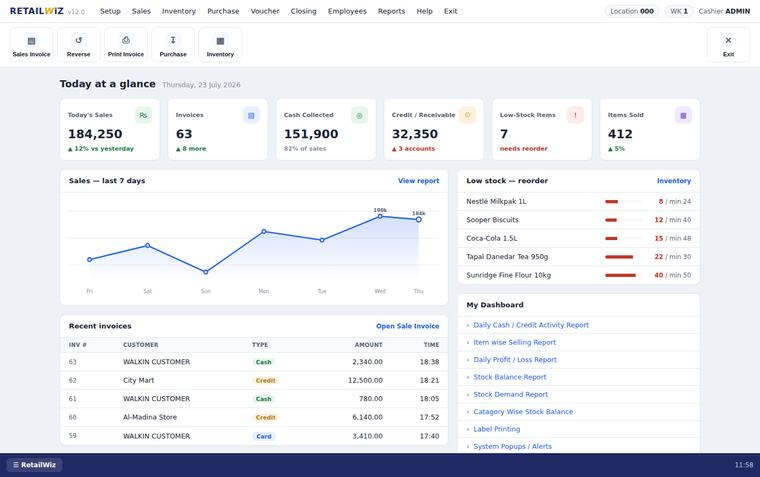
There is only one decision to make between the two editions, and it is not about how big your business is.
If they are looking — the owner checking the day from home, an accountant pulling a month, a partner watching a second branch — that is BizView. If they are working — raising an invoice, receiving stock, posting a voucher — that is BizView Plus. Everything else about the two is the same.
Not a cut-down version of anything. A proper reporting front end over the business you already run.
Sales so far, invoices raised, cash collected, credit outstanding, items sold, and what has fallen below its reorder level — before you have taken your coat off.
Sales, purchase, profit, stock and financial reports that already answer the question. No dragging fields into a canvas to find out what you sold on Tuesday.
Every report is a table you can shape — choose the columns, set the date range, sort it, and it stays that way next time you open it.
Open any invoice as the document it is, with a print layout drawn for paper rather than a screenshot of a web page.
Reports print under your company name and logo, not ours. It is your document going to your bank.
One keystroke opens a search across every report on the system. Faster than remembering which menu it lives under — and there are a lot of menus.
Everything in BizView, and then the screens that put figures in rather than take them out.
A cash sale and a credit sale are not the same screen with a customer attached. One is settled at the till; the other books against an account and has to respect that customer’s credit limit before it posts. They are built as two things because they are two things.
If material becomes something else before you sell it, this is the half of the system most retail software does not have — and the reason a factory outgrows a till.
This is not a cut-down version of the desktop report and it is not a different report. It is the same one, reached from a browser instead of from the machine in the shop.
Total at the top, every account underneath, total again at the foot. Switch it to Suppliers Summary and it answers the other half: what you owe, to whom, and how much of it altogether.
The report row is live. Click it.
| S.No | Account | Balance |
|---|---|---|
| 1 | Shaheen Cash & Carry | 107,650.00 |
| 2 | Hafeez Traders | 92,172.00 |
| 3 | Al-Madina Karyana | 59,575.00 |
| 4 | Bilal General Store | 55,076.00 |
| 5 | Naveed Traders | 31,140.00 |
| 6 | Al-Rehman Store | 23,160.00 |
| — | 17 more accounts | 117,527.00 |
| Total | 486,300.00 | |
| S.No | Account | Balance |
|---|---|---|
| 1 | Khyber Traders | 412,800.00 |
| 2 | Ravi Distributors | 318,450.00 |
| 3 | Pak Foods Supply Co | 264,900.00 |
| 4 | Gulberg Wholesale | 187,300.00 |
| 5 | New Star Enterprises | 132,650.00 |
| 6 | Zam Zam Distributors | 96,400.00 |
| — | 11 more accounts | 330,100.00 |
| Total | 1,742,600.00 | |
Named reports, grouped the way you would ask for them. Every one takes a date range and remembers the columns you chose.
Daily Sales · Invoice Sales · Sales by Customer · by Item · by Category · by Brand · by Department · Item Sales Detail · Category Sales Detail
Invoice Purchases · Purchases by Vendor · Item Purchase Detail
Profit by Invoice · Profit by Category — sale value less cost of goods, cut both ways
Stock Balance · Inventory Value · items with stock by location
Accounts Receivable · Accounts Payable · Receivable by Location · Payable by Location · Expenses · Chart of Accounts
Customer List · Supplier List · customer and supplier balances
The desktop editions are separated by what is in them. BizView is not. There is a base subscription, and after that every feature is priced on its own.
| Editions | BizView · BizView Plus |
|---|---|
| Platform | Any modern browser |
| Runs on | The same data as your RetailWiz counters |
| Sign-in | Username, password and an authorisation code |
| Updates | Always current — nothing to install |
| Licensing | Monthly subscription |
| Features | Priced as add-ons |
Why we sell it this way. A tier is somebody else’s guess about which features go together. A pharmacy and a workshop want different halves of the same system, and packaging them into Silver and Gold means one of them pays for the other’s features. Pricing each one separately is more work for us and a smaller invoice for you, which is the point.
BizView does not replace what is on the counter. It is the same business, opened from somewhere else.
| BizView | BizView Plus | RetailWiz POS / Full | |
|---|---|---|---|
| Where it runs | Browser | Browser | Installed on the shop’s machines |
| Needs internet | Yes | Yes | No — the shop’s own network |
| Reads the figures | ✓ | ✓ | ✓ |
| Writes sales & purchases | — | ✓ | ✓ |
| Stock adjustments & transfers | — | ✓ | ✓ |
| Production | — | ✓ | BizMan ERP |
| Reports | 30 | 30 | 64 in POS, about 151 in Full |
| Licensing | Monthly | Monthly | One-time + support |
Most shops want both. The counter stays on RetailWiz, because a till that stops when the internet does is not a till. BizView is for everyone who is not standing at that counter — and it is the reason you can be somewhere else.
BizView reads. BizView Plus writes. Both open the same data from any browser; BizView shows the dashboard, the reports and your invoices, and BizView Plus adds the screens that create and change them — sales, purchase, inventory, production and accounts.
No. The counter keeps running RetailWiz. BizView is the same business, reached from a browser instead of from the machine in the shop — for the owner at home, the accountant across town, or a second branch.
A base subscription, then features as add-ons. You pay for the modules you switch on and nothing else — ask for a cash book and it is priced and added; ask for WhatsApp and the same. Tell us what you need and we will price that, rather than selling you a tier built around somebody else’s shop.
Yes — it is reached through a browser, so it needs a connection. Your counters do not: RetailWiz keeps billing on the shop’s own network whether or not the internet is up, and BizView shows you those figures when you are away from the shop.
Real screens, real figures, fifteen minutes on a call afterwards if you want the rest of it.