
RetailWiz already knows every invoice you raised and every rupee of tax you charged on it. FBR Integration puts that on your own e.FBR portal — so your filing starts from your own till data instead of a workbook somebody rebuilds at the end of the month.
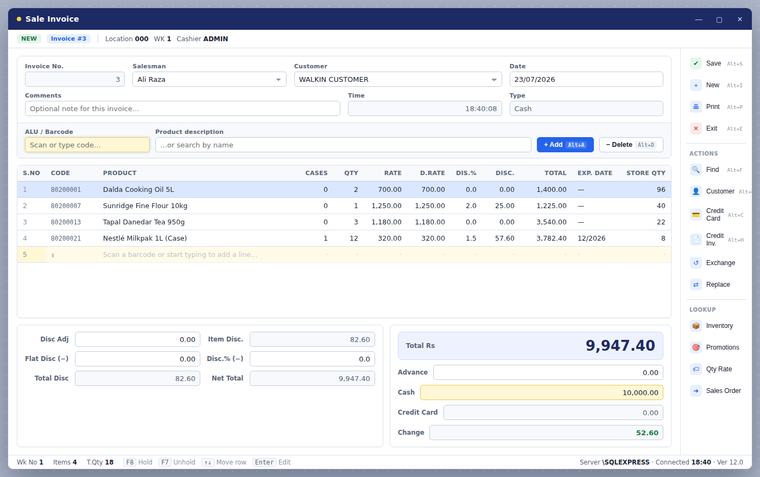
You run a business in Pakistan. Nobody needs to explain the portal to you, so this page will not. RetailWiz POS runs your counter; FBR Integration is the piece that puts the sale where FBR expects to find it. If that was the question, that is the answer.
Everything below is detail. If you have read enough, the demo is the faster way to check it.
Every invoice as it was actually rung up at the counter — not a summary typed in afterwards, and not a figure anybody had a chance to round.
The tax against each invoice, and against each item on it, at the rate that was really applied. What went on the customer’s receipt is what goes on the portal.
Your business, your e.FBR account, your credentials. We connect the software to it; the account stays yours and so does the filing.
This is the same RetailWiz POS your staff already run, with a compliance layer added behind it. Same billing screen, same shortcuts, same people. Nobody at the counter learns a second program, and there is no second set of figures that can disagree with the first — which is the usual reason compliance goes wrong in a shop.
Yes. RetailWiz POS runs the counter, and FBR Integration is the part that puts what the counter did onto your e.FBR portal — the sales, and the tax you charged on them.
Yes. FBR Integration is a separate licence added to RetailWiz rather than something bundled into it, because most shops do not need it and should not pay for it.
FBR Integration puts your sales and your tax onto your own portal. Digital Invoicing posts the invoice itself to IRIS at the moment you raise it, and it changes how the counter works. If you are being asked to invoice through IRIS, Digital Invoicing is the one you are looking for.
No. It is the same RetailWiz screens they already use. The compliance side sits behind the counter, not in front of it.
We will show you the compliance side running on a real invoice, and answer the question you actually came with.