
Not a batch at the end of the month, and not a file somebody exports and hopes about. The invoice is created at the counter, the software asks whether to post it, and it goes.
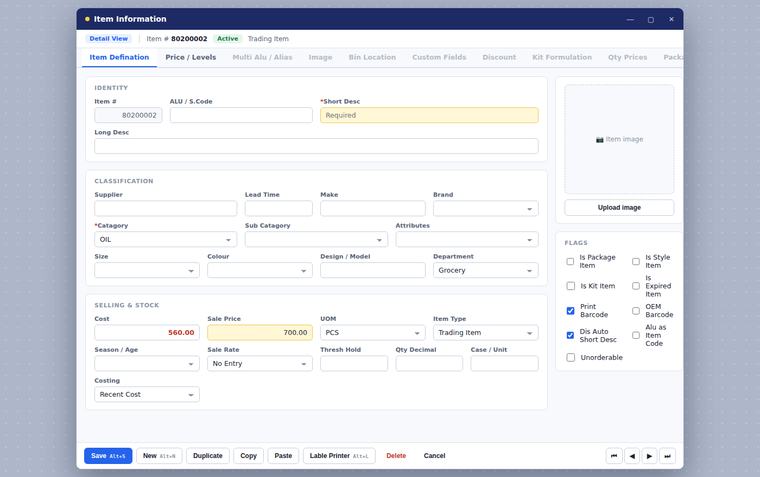
You know how digital invoicing works; you would not be on this page otherwise. So this page does not explain IRIS to you. It tells you what changes inside the software, because that is the part you cannot find out from a circular.
Unlike the portal upload, this one is visible at the counter and on the item master. Better you see it here than on the second day of using it.
The invoice is created, and the software asks whether to post it. Nothing goes to IRIS because a screen was left open or a key was held down — somebody says yes.
The code that identifies a customer for digital invoicing lives on the customer record, so it travels with every invoice they are on instead of being looked up each time.
One group is charged at one rate, another at a different one, and the group is chosen in the software. The cashier does not have to remember which customer is which.
Alongside the name and description you use on the shelf, the item carries a separate FBR block — its own description, its own tax and discount. They do not have to match what you call the thing, and in practice they often do not.
Set the codes and the groups up once, at installation, and the counter goes back to being a counter. We do that part with you.
Puts your sales and the tax you charged onto your own e.FBR portal. Nothing changes at the counter. See FBR Integration →
Posts the invoice itself to IRIS as you raise it, and changes the customer record, the item record and the moment of saving. This page.
Both sit on the same RetailWiz POS. Neither is a different till, and neither replaces the other — if you are unsure which you are being asked for, bring the notice to the demo and we will read it with you.
Yes. Digital Invoicing posts your invoices to IRIS from inside RetailWiz, at the moment you raise them.
No, and that is deliberate. When an invoice is created the software asks whether to post it. Posting is a decision somebody makes, not something that happens silently while a counter is busy.
They do not have to be. Customers sit in groups, and the rate belongs to the group rather than to the cashier’s memory. Put a customer in a group and their invoices carry that group’s rate.
FBR Integration takes what your counter did and puts it on your own e.FBR portal. Digital Invoicing posts the invoice to IRIS as it is raised, and it changes the software itself — the customer record, the item record and the moment the invoice is saved. If you are required to invoice through IRIS, this is the one.
We will show you the compliance side running on a real invoice, and answer the question you actually came with.